There are many options for setting up your email within the Settings, including a forwarding address, BCC, reply address, or even forwarding to an assigned user.
Navigation
- Navigate to Settings > Email Services.
- Select the Reply & Forward Settings tab.
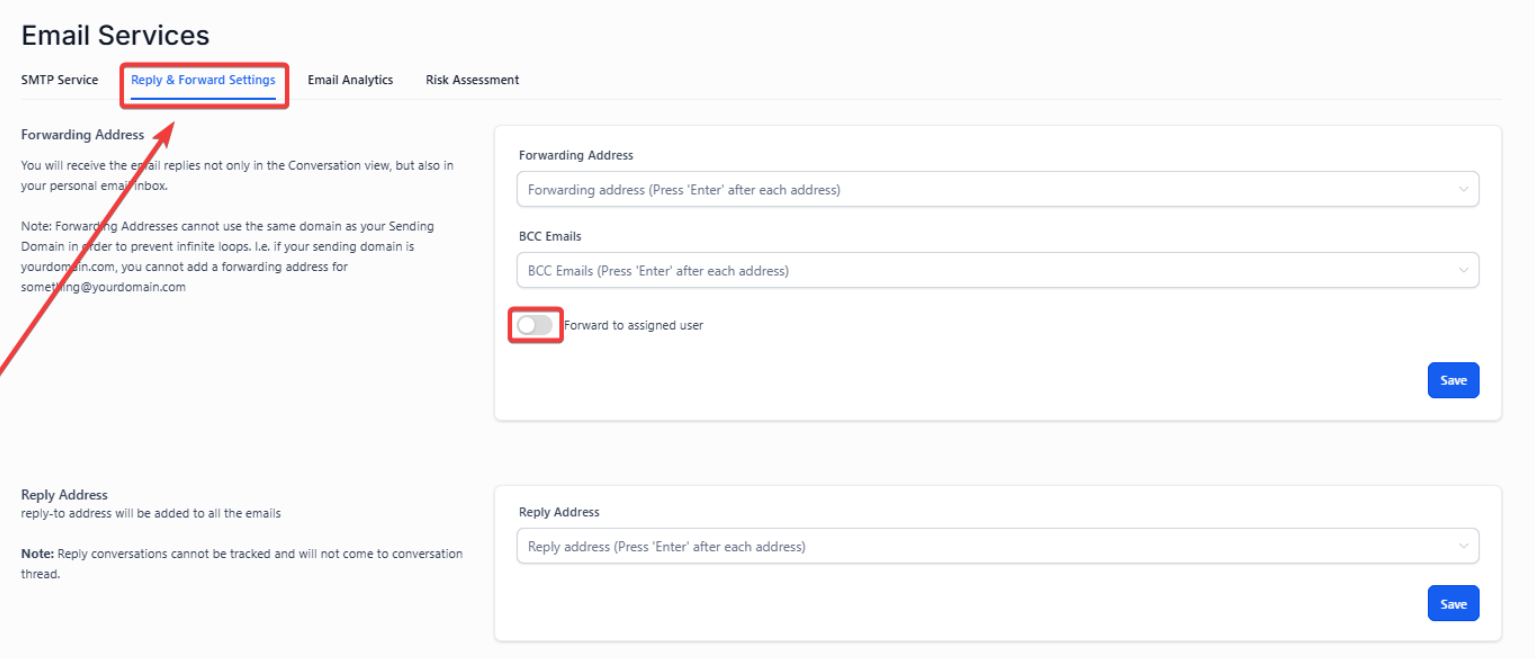
Here you will see Forwarding Address, BCC Emails, and a toggle for Forward to Assigned User. Choose your preferences based on the descriptions below:
- Forwarding address: Email replies will be sent to your personal email inbox and in Conversations.
- Forward to Assigned User: The specific user assigned to the particular lead will receive the email replies within their user email.
- BCC emails: You will receive a copy of every email that is sent from that account.
- Reply Address: Change the reply-to address that will be added to all emails.
Note: Reply conversations cannot be tracked and will not come to the conversation thread with a modified reply-to-address
Step 2: Hit Enter & Click Save to save your changes.
Note: With the forwarding address set up, if you reply to an email from a lead directly in your email inbox, it will not sync back into Infinite Sales.
FAQ’s
1. What does the BCC Emails option do?
- Answer: The BCC Emails option allows you to receive a copy of every email sent from the account. This is useful for keeping records of all outbound communications.
2. How can I change the reply-to address for my emails?
- Answer: You can change the reply-to address by navigating to the Reply & Forward Settings tab under Settings > Email Services. Enter the desired reply-to address, and this will be added to all outgoing emails.
3. What should I be aware of when changing the reply-to address?
- Answer: When you change the reply-to address, replies to emails will not be tracked back into the conversation thread within Infinite Sales. This means that conversations with a modified reply-to address may not sync with your system.
4. Will email replies sync back into Infinite Sales if I respond directly from my email inbox?
- Answer: No, if you reply to an email from a lead directly in your email inbox, the response will not sync back into Infinite Sales. To maintain conversation threads within Infinite Sales, replies should be made from within the platform.
5. How do I save my changes after setting up my email preferences?
- Answer: After configuring your email settings in the Reply & Forward Settings tab, Hit Enter & click Save to save your changes. This ensures that your preferences are applied and active.
6. What are the benefits of using the BCC Emails option?
- Answer: The BCC Emails option is beneficial for keeping a record of all emails sent from your account. It helps ensure that you have a copy of every communication, which can be useful for tracking and auditing purposes.
7. Can you add multiple forwarding addresses?
- Answer: You can add multiple forwarding addresses by simply hitting Enter after each one and then saving the configurations. Once completed, all email replies will be sent to the addresses you added to the forwarding addresses.