Ensuring that your emails reach your recipients’ inboxes is critical for effective communication and marketing. Unverified email addresses can lead to increased spam scores and compromised security. Introducing enhanced email deliverability with verified email addresses is a significant step to address these issues. This article will guide you through the benefits and the process of verifying email addresses to improve your email deliverability.
Steps to Verify Email Addresses During Campaign Scheduling
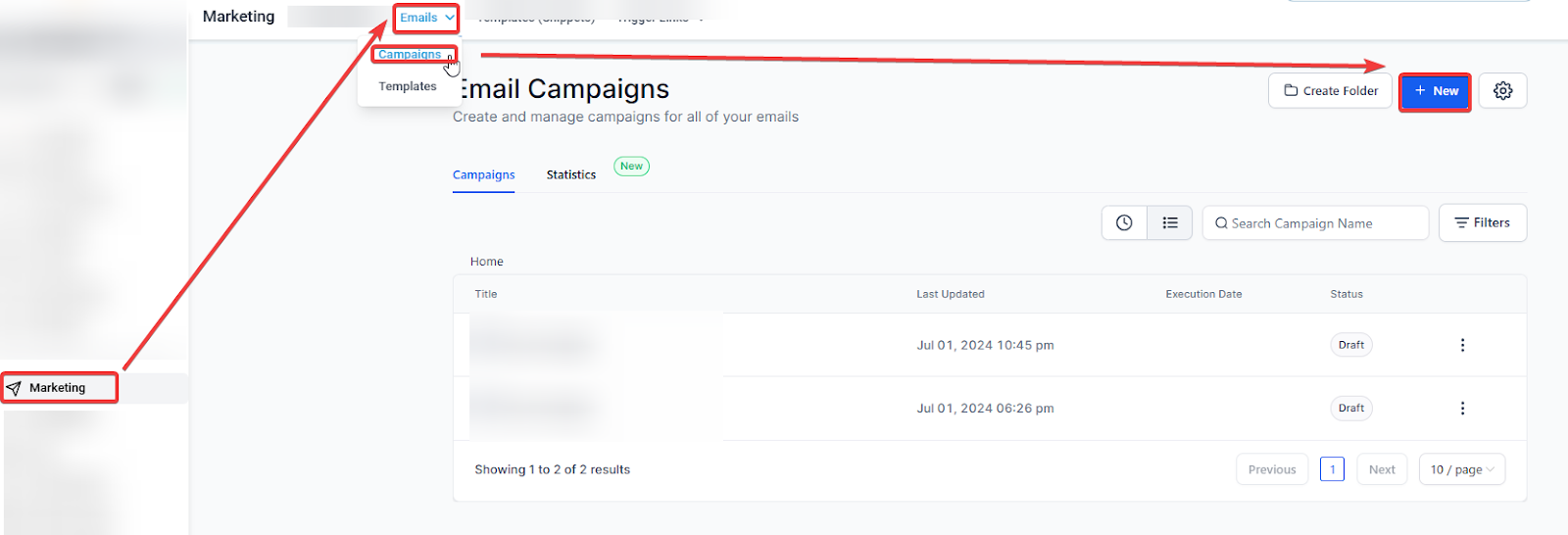
Step 1: Start a New Campaign
- Begin by creating a new email campaign in your account.
Step 2: Enter Sender Email
- Enter the email address you want to use as the sender for your campaign.
Step 3: Verification Prompt
- If the email address is not yet verified, you will see a prompt asking for verification.
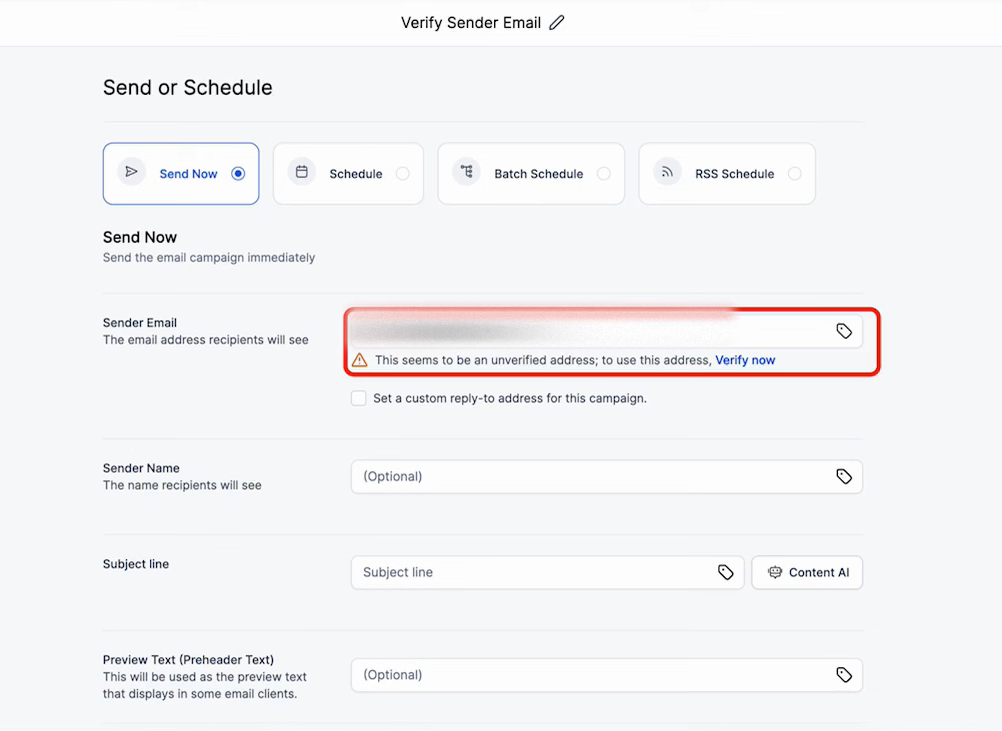
Step 4: Send Verification Email
- Click the button to send a verification email to the specified address. An email containing a verification code will be sent.
Step 5: Retrieve the Code
- Check the inbox of the email address you entered. Look for the verification email and note the code provided.
Step 6: Enter Verification Code
- Return to the campaign setup screen and enter the verification code in the prompted field.
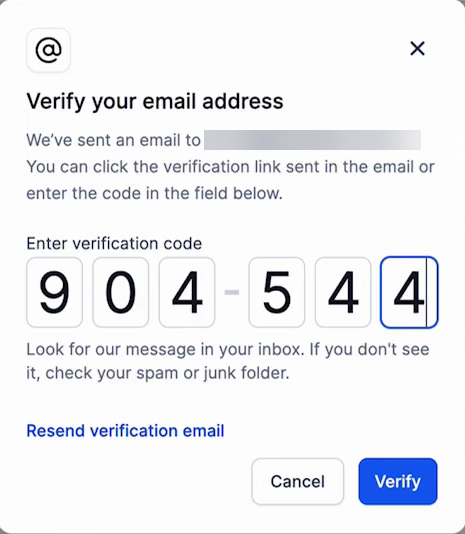
Step 7: Complete Verification
- Once you enter the correct code, the email address is verified. You can now use it for your campaign.
Step 8: Finish Scheduling Your Campaign
- Complete the rest of the campaign scheduling process, confident that your verified email address will improve deliverability.
Pre-Verification
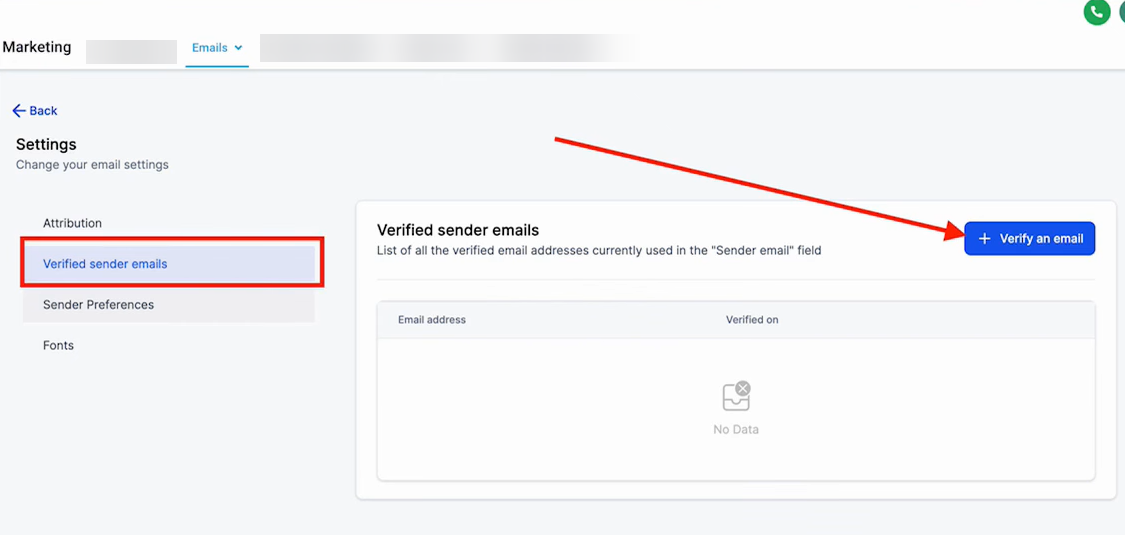
- You can pre-verify email addresses through the settings section.
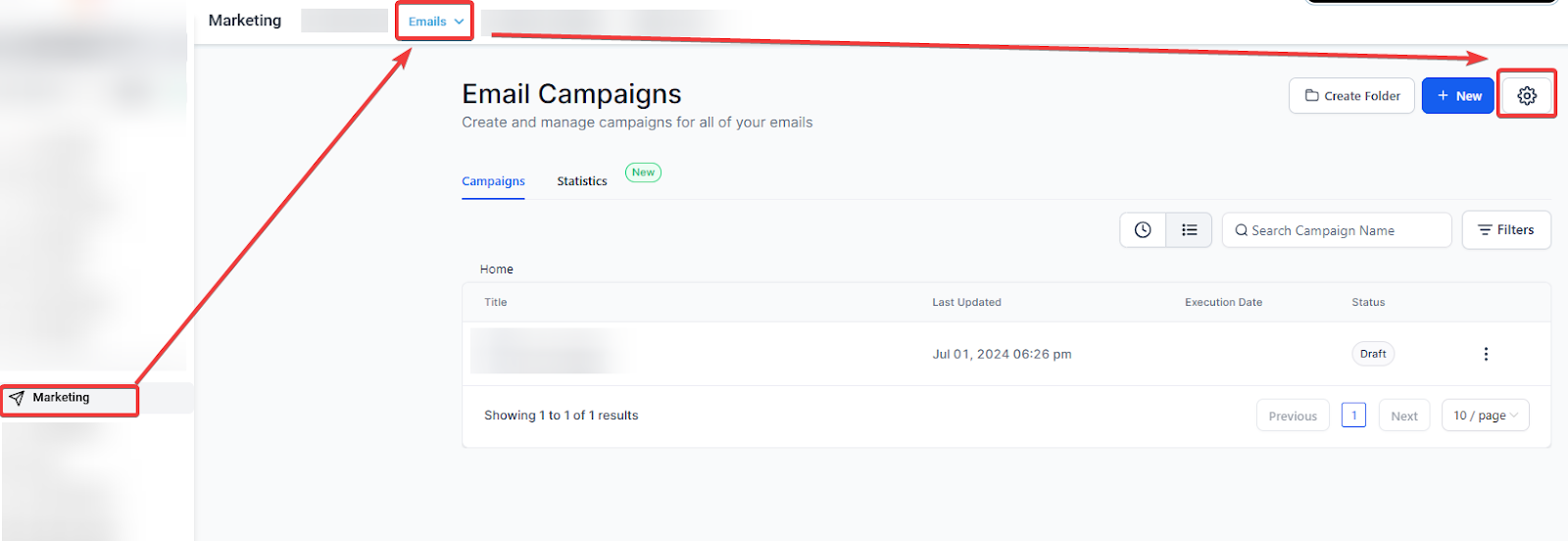
- Under the verified sender emails, select the option to send a verification email and follow the same process.
Why Verify Email Addresses?
Email verification serves multiple purposes that contribute to better email deliverability:
- Reduces Spam Scores: Verified email addresses help lower the likelihood of your emails being marked as spam. Email providers are more likely to trust emails from verified senders, improving your sender reputation.
- Prevents Unauthorized Use: Verifying email addresses ensures that no unauthorized individuals can use your email address to send out emails. This helps in maintaining the integrity and security of your email communications.
- Ensures Accuracy: By verifying email addresses, you can ensure that the emails you send out are actually coming from valid and existing addresses. This helps in reducing bounce rates and improving overall campaign performance.
Pro Tips for Enhanced Email Deliverability
- Use a Consistent Domain: Sending emails from a consistent domain helps build a strong sender reputation over time. Avoid frequently changing your sender email addresses.
- Monitor Your Sender Reputation: Regularly check your sender reputation using tools provided by email service providers or third-party services. This can help you identify and resolve issues that may be affecting your deliverability.
- Implement SPF, DKIM, and DMARC: These email authentication protocols help protect your domain from being used in phishing or spam attacks. Setting up SPF (Sender Policy Framework), DKIM (DomainKeys Identified Mail), and DMARC (Domain-based Message Authentication, Reporting & Conformance) can further enhance your email security and deliverability.
- Clean Your Email List Regularly: Remove invalid or inactive email addresses from your list to reduce bounce rates and improve engagement metrics. This practice also helps maintain a good sender reputation.
FAQ
Q: What happens if I don’t verify my email address?
A: If you do not verify your email address, your emails may have a higher chance of being marked as spam or not delivered at all. Email service providers often require verification to ensure the authenticity of the sender.
Q: Can I use multiple email addresses for sending emails?
A: Yes, you can use multiple email addresses, but it is important to verify each one to ensure they are authorized for use. This helps maintain a good sender reputation and reduces the risk of your emails being marked as spam.
Q: What should I do if my verification email is not received?
A: Check your spam or junk folder as the verification email might have been filtered there. If you still cannot find it, ensure that you entered the correct email address and try resending the verification email. If the issue persists, contact your email service provider for further assistance.